Hello visitor !!!!! today i came with another solution . The solution of the problem to move app/games from internal memory to Scard in lollipop. Now you need not to worry about the low memory internal memory. You always get frustrated when you download the some games and apps on android lollipop because in the lollipop the default installation location is set as internal memory. By using the below process you can set your default installation location to SD card in android lollipop or CM 12 Roms **

Steps to follow to change default installation location to SD Card.
** In the first step you have to open the setting and then navigate the app*
** After navigation you have to click on the the dots app on the right corner*

*** When you click on the dots you will see a menu just like the below image *
** And now you have to select the preferred installation location *
*** And then you have to removable SD card *
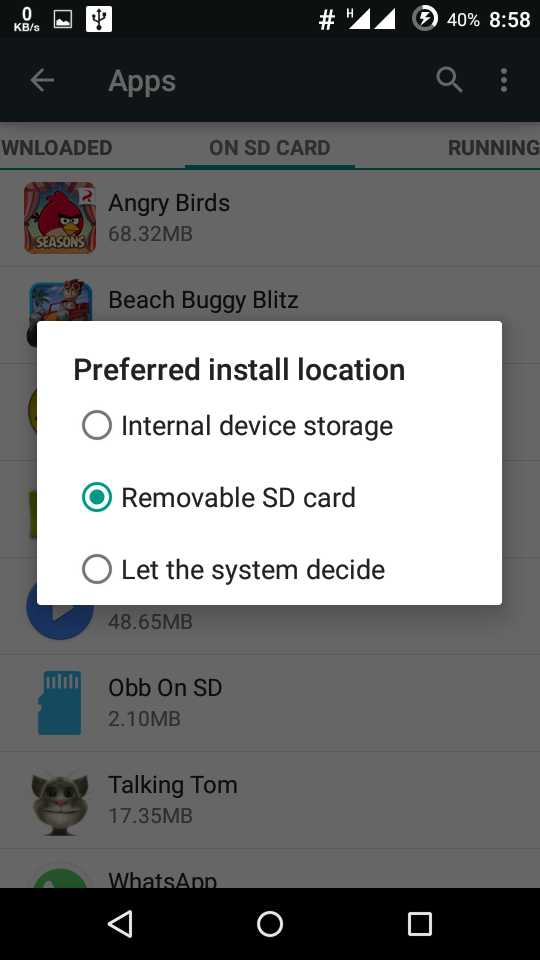
** Congratulation you have done you select the location is set as SD card *
** And you will never face low memory problem just uninstall all the app and then install it in the SD card
KEEP Reading.
0 comments:
Post a Comment